Simple Pie Chart
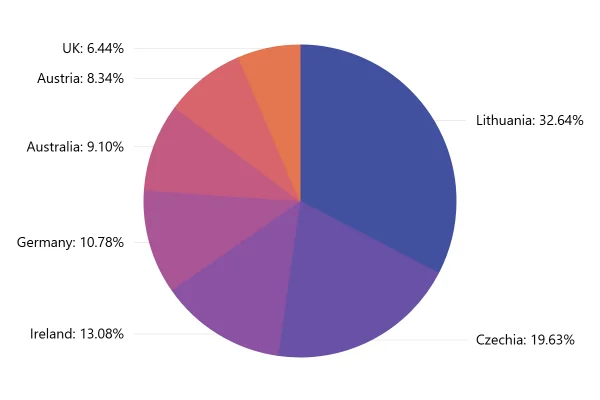
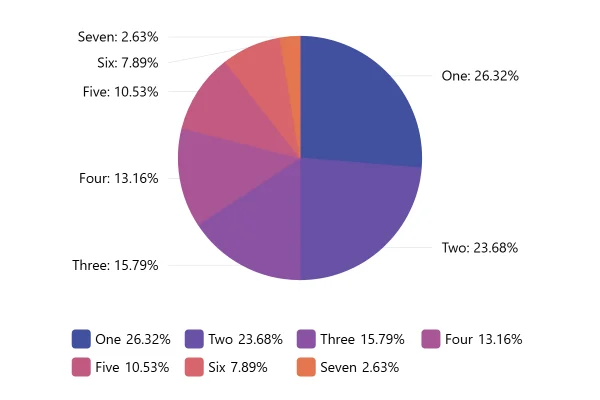
A pie chart with nothing extra: seven values, seven slices, and no legend or settings in the way. A clean starting point for your own.
About this chart
What a pie chart needs
Just a list of categories and their values. The chart works out each slice’s share of the total, so the numbers can be counts, money or hours. They only need to describe parts of one whole.
Good for
- A quick look at how something splits
- Data straight from a spreadsheet: one column of names, one of numbers
- A first draft to style later
Think twice when
- Negative values: a slice can’t be smaller than nothing
- Numbers that overlap, like survey answers where people could pick several
- The same split across several years: use stacked columns
For developers
Get the code.
Built with amCharts 5, a JavaScript library. The JavaScript includes your theme and renderer (canvas or SVG); the JSON also follows the changes you make with the controls.
For projects that use npm:
How it reads:
npm install @amcharts/amcharts5. See Getting started.
The same chart as a JSON config. Chart Maker reads and writes this format, the library's JSON parser turns it into a chart, and the <am5-chart> element puts it on a page with no code.How it reads:
"type" is the class to create and "settings" what you would pass to its new() in code; "properties" fill in its parts, lists such as series and axes or templates such as columns.template; "refs" holds objects used in more than one place ("#series-0" stands for the one named series-0); a string starting with "@" takes a value from another object, such as "@series.get('fill')".
A complete page. Save it as an .html file and open it in a browser.
Paste this into an AI coding assistant to build the chart from scratch. More in amCharts & AI.
// Create root element
// https://www.amcharts.com/docs/v5/getting-started/#Root_element
var root = am5.Root.new("chartdiv");

// Set themes
// https://www.amcharts.com/docs/v5/concepts/themes/
root.setThemes([
  am5themes_Animated.new(root),
  am5themes_Responsive.new(root)
]);

// Create chart
// https://www.amcharts.com/docs/v5/charts/percent-charts/pie-chart/
var chart = root.container.children.push(am5percent.PieChart.new(root, {
  layout: root.verticalLayout // a legend added to the chart would go below the pie
}));

// Create series
// https://www.amcharts.com/docs/v5/charts/percent-charts/pie-chart/#Series
var series = chart.series.push(am5percent.PieSeries.new(root, {
  valueField: "value",
  categoryField: "category"
}));

// Set data
// https://www.amcharts.com/docs/v5/charts/percent-charts/pie-chart/#Setting_data
series.data.setAll([
  { value: 10, category: "One" },
  { value: 9, category: "Two" },
  { value: 6, category: "Three" },
  { value: 5, category: "Four" },
  { value: 4, category: "Five" },
  { value: 3, category: "Six" },
  { value: 1, category: "Seven" },
]);

// Play initial series animation
// https://www.amcharts.com/docs/v5/concepts/animations/#Animation_of_series
series.appear(1000, 100);
{
"type": "PieChart",
"settings": {
"layout": {
"type": "VerticalLayout"
}
},
"properties": {
"series": [
"#series-0"
]
},
"refs": [
{
"data-0": [
{
"value": 10,
"category": "One"
},
{
"value": 9,
"category": "Two"
},
{
"value": 6,
"category": "Three"
},
{
"value": 5,
"category": "Four"
},
{
"value": 4,
"category": "Five"
},
{
"value": 3,
"category": "Six"
},
{
"value": 1,
"category": "Seven"
}
]
},
{
"series-0": {
"type": "PieSeries",
"settings": {
"valueField": "value",
"categoryField": "category"
},
"properties": {
"data": "#data-0"
}
}
}
]
}