Exporting plugin
amCharts 5 comes with a bundled Exporting plugin.
You can export charts to most popular image formats like PNG, JPEG, as well as PDF. Data can be exported as CSV, JSON, or XLSX.
Build this chart with AI
The prompt below can be used to build this chart with AI. For best coding results, use the most advanced AI models, like Claude Opus 5 and GPT-5.6-Codex. For more info and tips, check out amCharts AI docs.
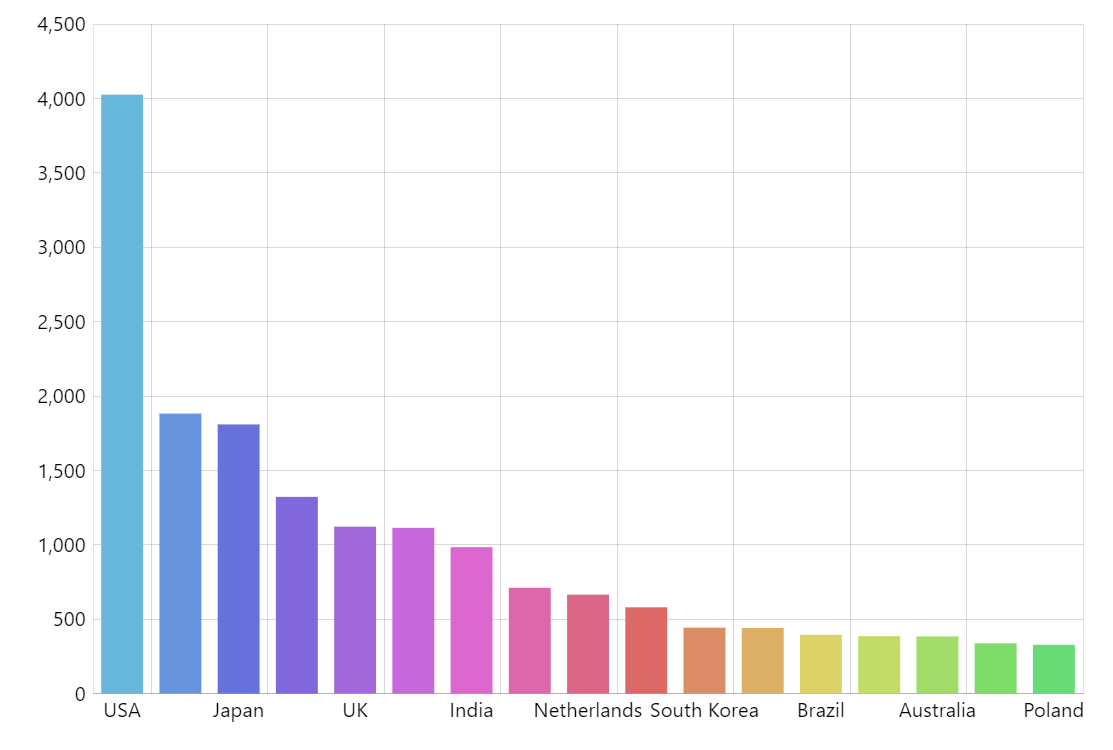
Create a column chart showing visitor counts for 16 countries (USA 4025, China 1882, Japan 1809, etc. down to Poland 328). Assign each column a different color from the chart's color palette with wide columns and no visible borders. The horizontal axis shows country names with tooltips; the vertical axis shows values with subtle grid lines. Show tooltips with the country name and visit count on hover. Enable mouse-wheel horizontal zoom. Animate on load. Include an export menu so users can save the chart as an image (PNG, JPEG, PDF) or export the data as CSV, JSON, or XLSX. Use amCharts 5 library.
Demo source