Nested Donut Chart
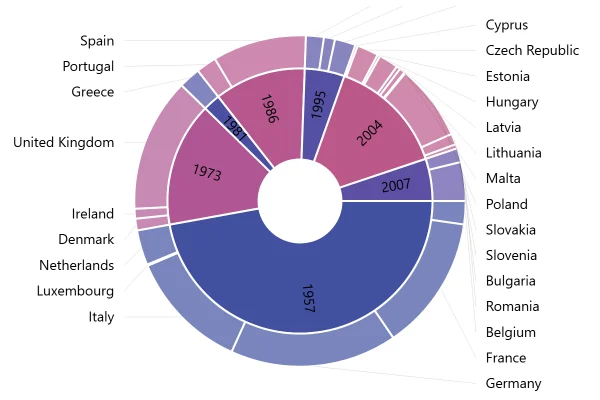
Two rings, one inside the other, for two measures of the same countries: bottles sold inside, litres outside. Where the rings don’t line up, the measures disagree.
About this chart
When to nest donuts
Nesting puts two splits of the same items side by side, so you can see where they differ: a country that sells many bottles but few litres sells small bottles. Two rings read well; by the third, the inner ones get too thin to compare.
Good for
- Two measures of the same categories
- This year against last year
- Planned against actual
Think twice when
- More than two or three rings
- Rings with different categories: use two separate charts
- Exact differences between rings: a grouped bar chart shows them better
For developers
Get the code.
Built with amCharts 5, a JavaScript library. The JavaScript includes your theme and renderer (canvas or SVG); the JSON also follows the changes you make with the controls.
For projects that use npm:
How it reads:
npm install @amcharts/amcharts5. See Getting started.
The same chart as a JSON config. Chart Maker reads and writes this format, the library's JSON parser turns it into a chart, and the <am5-chart> element puts it on a page with no code.How it reads:
"type" is the class to create and "settings" what you would pass to its new() in code; "properties" fill in its parts, lists such as series and axes or templates such as columns.template; "refs" holds objects used in more than one place ("#series-0" stands for the one named series-0); a string starting with "@" takes a value from another object, such as "@series.get('fill')".
A complete page. Save it as an .html file and open it in a browser.
Paste this into an AI coding assistant to build the chart from scratch. More in amCharts & AI.
// Create root element
// https://docs.amcharts.com/v5/getting-started/#root-element
var root = am5.Root.new("chartdiv");

// Set themes
// https://docs.amcharts.com/v5/concepts/themes/
root.setThemes([
  am5themes_Animated.new(root),
  am5themes_Responsive.new(root)
]);

// Create chart
// https://docs.amcharts.com/v5/charts/percent-charts/pie-chart/
var chart = root.container.children.push(am5percent.PieChart.new(root, {
  layout: root.verticalLayout, // the chart's parts are stacked top to bottom
  innerRadius: am5.percent(40) // a hole in the middle, 40% of the radius
}));

// Create series
// https://docs.amcharts.com/v5/charts/percent-charts/pie-chart/#series
// two series in one pie chart make two rings: bottles inside, litres outside
var series0 = chart.series.push(am5percent.PieSeries.new(root, {
  valueField: "bottles",
  categoryField: "country",
  alignLabels: false
}));

var bgColor = root.interfaceColors.get("background"); // the background color, for the gaps between slices

series0.ticks.template.setAll({ forceHidden: true });  // no ticks...
series0.labels.template.setAll({ forceHidden: true }); // ...and no labels on the inner ring
series0.slices.template.setAll({
  stroke: bgColor, // a 2px outline in the background color...
  strokeWidth: 2,  // ...looks like a gap between the slices
  tooltipText:     // the country, its share with two decimals, and the bottles
    "{category}: {valuePercentTotal.formatNumber('0.00')}% ({value} bottles)"
});
// a hovered inner slice shrinks a little instead of growing into the outer ring
series0.slices.template.states.create("hover", { scale: 0.95 });

var series1 = chart.series.push(am5percent.PieSeries.new(root, {
  valueField: "litres",
  categoryField: "country",
  // labels line up in columns on both sides instead of sitting next to their slices
  alignLabels: true
}));

series1.slices.template.setAll({
  stroke: bgColor, // a 2px outline in the background color...
  strokeWidth: 2,  // ...looks like a gap between the slices
  tooltipText:     // the country, its share with two decimals, and the litres
    "{category}: {valuePercentTotal.formatNumber('0.00')}% ({value} litres)"
});

var data = [{
  country: "Lithuania",
  litres: 501.9,
  bottles: 1500
}, {
  country: "Czechia",
  litres: 301.9,
  bottles: 990
}, {
  country: "Ireland",
  litres: 201.1,
  bottles: 785
}, {
  country: "Germany",
  litres: 165.8,
  bottles: 255
}, {
  country: "Australia",
  litres: 139.9,
  bottles: 452
}, {
  country: "Austria",
  litres: 128.3,
  bottles: 332
}, {
  country: "UK",
  litres: 99,
  bottles: 150
}, {
  country: "Belgium",
  litres: 60,
  bottles: 178
}, {
  country: "The Netherlands",
  litres: 50,
  bottles: 50
}];

// Set data
// https://docs.amcharts.com/v5/charts/percent-charts/pie-chart/#setting-data
series0.data.setAll(data);
series1.data.setAll(data);

// Play initial series animation
// https://docs.amcharts.com/v5/concepts/animations/#animation-of-series
series0.appear(1000, 100);
series1.appear(1000, 100);
{
"type": "PieChart",
"settings": {
"layout": {
"type": "VerticalLayout"
},
"innerRadius": {
"type": "Percent",
"value": 40
}
},
"properties": {
"series": [
"#series-0",
"#series-1"
]
},
"refs": [
{
"data-0": [
{
"country": "Lithuania",
"litres": 501.9,
"bottles": 1500
},
{
"country": "Czechia",
"litres": 301.9,
"bottles": 990
},
{
"country": "Ireland",
"litres": 201.1,
"bottles": 785
},
{
"country": "Germany",
"litres": 165.8,
"bottles": 255
},
{
"country": "Australia",
"litres": 139.9,
"bottles": 452
},
{
"country": "Austria",
"litres": 128.3,
"bottles": 332
},
{
"country": "UK",
"litres": 99,
"bottles": 150
},
{
"country": "Belgium",
"litres": 60,
"bottles": 178
},
{
"country": "The Netherlands",
"litres": 50,
"bottles": 50
}
]
},
{
"series-0": {
"type": "PieSeries",
"settings": {
"valueField": "bottles",
"categoryField": "country",
"alignLabels": false
},
"properties": {
"data": "#data-0",
"slices": {
"properties": {
"template": {
"settings": {
"stroke": "@root.interfaceColors.get('background')",
"strokeWidth": 2,
"tooltipText": "{category}: {valuePercentTotal.formatNumber('0.00')}% ({value} bottles)"
},
"states": [
{
"key": "hover",
"settings": {
"scale": 0.95
}
}
]
}
}
},
"labels": {
"properties": {
"template": {
"settings": {
"forceHidden": true
}
}
}
},
"ticks": {
"properties": {
"template": {
"settings": {
"forceHidden": true
}
}
}
}
}
}
},
{
"series-1": {
"type": "PieSeries",
"settings": {
"valueField": "litres",
"categoryField": "country",
"alignLabels": true
},
"properties": {
"data": "#data-0",
"slices": {
"properties": {
"template": {
"settings": {
"stroke": "@root.interfaceColors.get('background')",
"strokeWidth": 2,
"tooltipText": "{category}: {valuePercentTotal.formatNumber('0.00')}% ({value} litres)"
}
}
}
}
}
}
}
]
}