Two Linked Pie Charts with a Legend
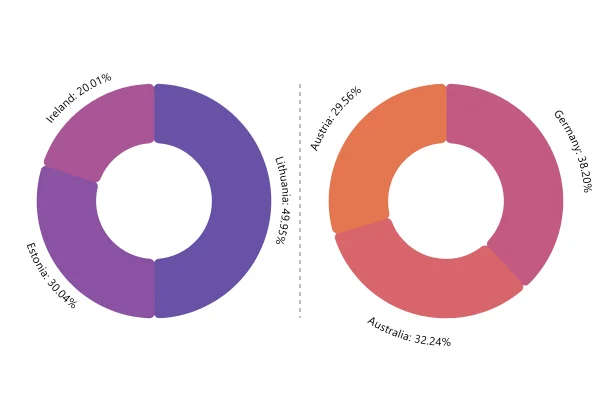
Two donuts, one legend: the same four countries in two groups side by side, each with its total in the middle. Point at a slice and its twin lights up in the other donut.
About this chart
When two pies beat one
Two pies compare how two groups split the same categories: this year and last, or two regions. The shared legend and the linked hover tie the colors together, so the eye can jump between them. For exact differences, a grouped bar chart is still clearer.
Good for
- Two years, two regions or two teams
- Before and after a change
- Groups of very different size: each donut shows its own total
Think twice when
- More than two or three groups: use 100% stacked columns
- Small changes in share: they are hard to spot between pies
- Different categories in each pie: one legend can’t cover both
For developers
Get the code.
Built with amCharts 5, a JavaScript library. The code includes your theme and renderer (canvas or SVG), but not the changes you make with the controls.
For projects that use npm:
How it reads:
npm install @amcharts/amcharts5. See Getting started.
The same chart as a JSON config. Chart Maker reads and writes this format, the library's JSON parser turns it into a chart, and the <am5-chart> element puts it on a page with no code.How it reads:
"type" is the class to create and "settings" what you would pass to its new() in code; "properties" fill in its parts, lists such as series and axes or templates such as columns.template; "refs" holds objects used in more than one place ("#series-0" stands for the one named series-0); a string starting with "@" takes a value from another object, such as "@series.get('fill')".
A complete page. Save it as an .html file and open it in a browser.
Paste this into an AI coding assistant to build the chart from scratch. More in amCharts & AI.
// Create root element
// https://docs.amcharts.com/v5/getting-started/#root-element
var root = am5.Root.new("chartdiv");

// Set themes
// https://docs.amcharts.com/v5/concepts/themes/
root.setThemes([
  am5themes_Animated.new(root),
  am5themes_Responsive.new(root)
]);

// the two charts on top, the shared legend under them
root.container.set("layout", root.verticalLayout);

// Create container to hold charts
var chartContainer = root.container.children.push(am5.Container.new(root, {
  layout: root.horizontalLayout, // the two charts side by side
  width: am5.p100,               // filling the space the legend leaves
  height: am5.p100
}));

// Create the 1st chart
// https://docs.amcharts.com/v5/charts/percent-charts/pie-chart/
var chart = chartContainer.children.push(
  am5percent.PieChart.new(root, {
    endAngle: 270,               // the ring ends at the top, where it starts: a full circle
    innerRadius: am5.percent(60) // a hole 60% of the radius wide, for the total
  })
);

var series = chart.series.push(
  am5percent.PieSeries.new(root, {
    valueField: "value",
    categoryField: "category",
    endAngle: 270,
    alignLabels: false // the names follow the ring, not lined up in columns
  })
);

// the total in the middle of the ring: {valueSum} adds up the series' values
series.children.push(am5.Label.new(root, {
  centerX: am5.percent(50), // centered in the hole
  centerY: am5.percent(50),
  text: "First: {valueSum}",
  populateText: true, // fills in {valueSum}
  fontSize: "1.5em"   // 1.5 times the chart's text size
}));

series.slices.template.setAll({
  cornerRadius: 8 // rounded slice corners
})

// hidden, the ring closes up at the top, so it sweeps open clockwise on load
series.states.create("hidden", {
  endAngle: -90
});

// names only along the ring; the shares are in the tooltips and the legend
series.labels.template.setAll({
  textType: "circular",
  text: "{category}"
});

// Create the 2nd chart
// https://docs.amcharts.com/v5/charts/percent-charts/pie-chart/
var chart2 = chartContainer.children.push(
  am5percent.PieChart.new(root, {
    endAngle: 270,
    innerRadius: am5.percent(60)
  })
);

var series2 = chart2.series.push(
  am5percent.PieSeries.new(root, {
    valueField: "value",
    categoryField: "category",
    endAngle: 270,
    alignLabels: false,
    tooltip: am5.Tooltip.new(root, {}) // a separate tooltip needed for this series
  })
);

series2.children.push(am5.Label.new(root, {
  centerX: am5.percent(50),
  centerY: am5.percent(50),
  text: "Second: {valueSum}",
  populateText: true,
  fontSize: "1.5em"
}));

series2.slices.template.setAll({
  cornerRadius: 8
})

series2.states.create("hidden", {
  endAngle: -90
});

series2.labels.template.setAll({
  textType: "circular",
  text: "{category}"
});

// Duplicate interaction
// Must be added before setting data
series.slices.template.events.on("pointerover", function(ev) {
  var slice = ev.target;
  var dataItem = slice.dataItem;
  var otherSlice = getSlice(dataItem, series2);

  if (otherSlice) {
    otherSlice.hover();
  }
});

// and unhover it when the pointer leaves
series.slices.template.events.on("pointerout", function(ev) {
  var slice = ev.target;
  var dataItem = slice.dataItem;
  var otherSlice = getSlice(dataItem, series2);

  if (otherSlice) {
    otherSlice.unhover();
  }
});

// a click that pulls a slice out pulls out the same country in the other chart
series.slices.template.on("active", function(active, target) {
  var slice = target;
  var dataItem = slice.dataItem;
  var otherSlice = getSlice(dataItem, series2);

  if (otherSlice) {
    otherSlice.set("active", active);
  }
});

// Same for the 2nd series
series2.slices.template.events.on("pointerover", function(ev) {
  var slice = ev.target;
  var dataItem = slice.dataItem;
  var otherSlice = getSlice(dataItem, series);

  if (otherSlice) {
    otherSlice.hover();
  }
});

series2.slices.template.events.on("pointerout", function(ev) {
  var slice = ev.target;
  var dataItem = slice.dataItem;
  var otherSlice = getSlice(dataItem, series);

  if (otherSlice) {
    otherSlice.unhover();
  }
});

series2.slices.template.on("active", function(active, target) {
  var slice = target;
  var dataItem = slice.dataItem;
  var otherSlice = getSlice(dataItem, series);

  if (otherSlice) {
    otherSlice.set("active", active);
  }
});

// Set data
// https://docs.amcharts.com/v5/charts/percent-charts/pie-chart/#setting-data
series.data.setAll([{
  category: "Lithuania",
  value: 501
}, {
  category: "Czechia",
  value: 301
}, {
  category: "Ireland",
  value: 201
}, {
  category: "Germany",
  value: 165
}]);

// Set data
// https://docs.amcharts.com/v5/charts/percent-charts/pie-chart/#setting-data
series2.data.setAll([{
  category: "Lithuania",
  value: 201
}, {
  category: "Czechia",
  value: 101
}, {
  category: "Ireland",
  value: 51
}, {
  category: "Germany",
  value: 15
}]);

// finds the slice for the same country in the given series
function getSlice(dataItem, series) {
  var otherSlice;
  am5.array.each(series.dataItems, function(di) {
    if (di.get("category") === dataItem.get("category")) {
      otherSlice = di.get("slice");
    }
  });

  return otherSlice;
}

// Create legend
var legend = root.container.children.push(am5.Legend.new(root, {
  x: am5.percent(50), // centered under the charts
  centerX: am5.percent(50)
}));

// Trigger all the same for the 2nd series
legend.itemContainers.template.events.on("pointerover", function(ev) {
  var dataItem = ev.target.dataItem.dataContext;
  var slice = getSlice(dataItem, series2);
  slice.hover();
});

// and unhover it again
legend.itemContainers.template.events.on("pointerout", function(ev) {
  var dataItem = ev.target.dataItem.dataContext;
  var slice = getSlice(dataItem, series2);
  slice.unhover();
});

// a legend click hides or shows the country in the second chart too
legend.itemContainers.template.on("disabled", function(disabled, target) {
  var dataItem = target.dataItem.dataContext;
  var slice = getSlice(dataItem, series2);
  if (disabled) {
    series2.hideDataItem(slice.dataItem);
  }
  else {
    series2.showDataItem(slice.dataItem);
  }
});

// one legend for both charts: it lists the first chart's slices, the code above mirrors them
legend.data.setAll(series.dataItems);

series.appear(1000, 100);