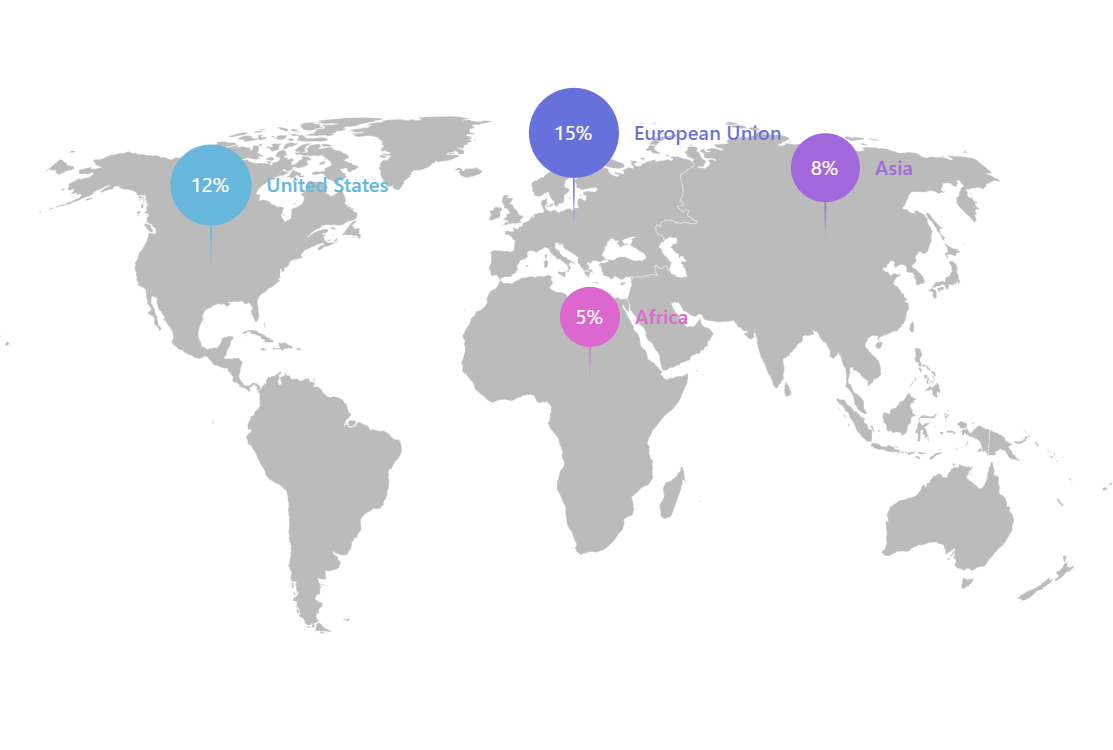
Map with Sized Pin Bullets
This demo implements pin-like bullets with the pin head size adjusted based on the corresponding value.
Key implementation details
We are working with bullets on a map point series. We create a Container which is a composite of the parts of our pin. We adjust the pin head radius based on the data item’s value and create a Circle in the container with that radius and vertically offset it accordingly. Then we create a Line for the pin pole and a Label. Finally, we set our composite container as the sprite for our Bullet.
Related tutorials
Build this chart with AI
The prompt below can be used to build this chart with AI. For best coding results, use the most advanced AI models, like Claude Opus 4.6 and GPT-5.3-Codex. For more info and tips, check out amCharts AI docs.
Create a world map with custom pin markers at four regional data points: United States (12%), European Union (15%), Asia (8%), and Africa (5%). Each pin should have a colored circular head sized relative to its value, a pole line extending downward, a white percentage label on the pin head, and a colored region title label beside the pin. Assign each pin a different color. Use a light gray base map. Support basic map panning and zooming. Use amCharts 5 library.
Demo source