Stacked Bar Chart with Negative Values
A population pyramid: men to the left, women to the right, one pair of bars for each age group, from 0–4 at the bottom to 85+ at the top. The men’s values are negative in the data, and the labels show them without the minus sign.
About this chart
When a population pyramid works
Putting two groups back to back on one axis compares them row by row and shows the shape of the whole at a glance: a wide base for a young population, a column for an aging one. It needs two groups that split the same categories, like men and women.
Good for
- Population by age and sex
- Survey answers from two groups
- Two sides of one breakdown, like imports and exports
Think twice when
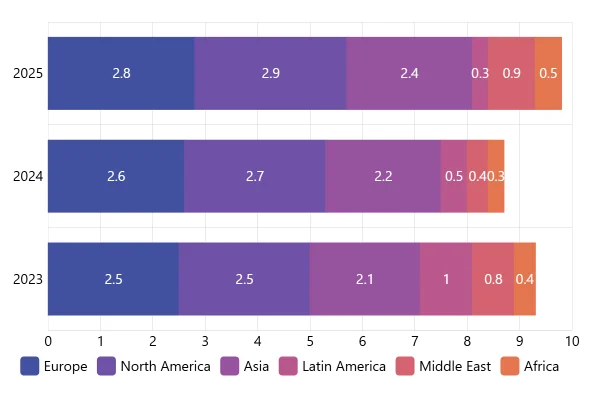
- More than two groups: stack or cluster the bars
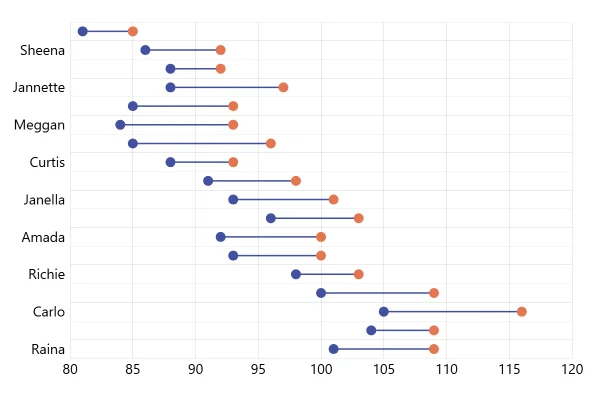
- Comparing the two sides exactly: a dumbbell plot puts them on one baseline
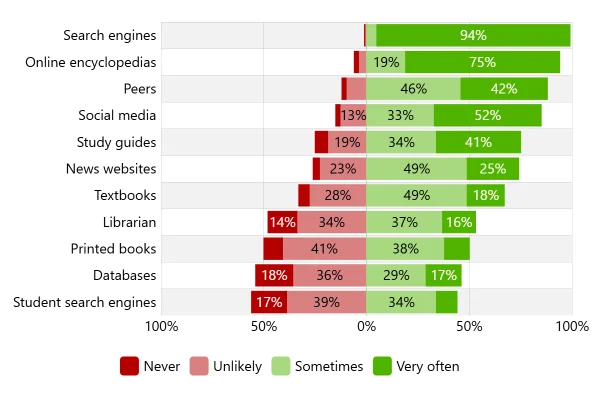
- Agree and disagree answers: diverging stacked bars suit them better
For developers
Get the code.
Built with amCharts 5, a JavaScript library. The JavaScript includes your theme and renderer (canvas or SVG); the JSON also follows the changes you make with the controls.
For projects that use npm:
How it reads:
npm install @amcharts/amcharts5. See Getting started.
The same chart as a JSON config. Chart Maker reads and writes this format, the library's JSON parser turns it into a chart, and the <am5-chart> element puts it on a page with no code.How it reads:
"type" is the class to create and "settings" what you would pass to its new() in code; "properties" fill in its parts, lists such as series and axes or templates such as columns.template; "refs" holds objects used in more than one place ("#series-0" stands for the one named series-0); a string starting with "@" takes a value from another object, such as "@series.get('fill')".
A complete page. Save it as an .html file and open it in a browser.
Paste this into an AI coding assistant to build the chart from scratch. More in amCharts & AI.
// Create root element
// https://docs.amcharts.com/v5/getting-started/#root-element
var root = am5.Root.new("chartdiv");

// Set themes
// https://docs.amcharts.com/v5/concepts/themes/
root.setThemes([
  am5themes_Animated.new(root),
  am5themes_Responsive.new(root)
]);

// Create chart
// https://docs.amcharts.com/v5/charts/xy-chart/
var chart = root.container.children.push(
  am5xy.XYChart.new(root, {
    panX: false,            // a drag doesn't pan: the cursor zooms with it
    panY: false,
    wheelX: "panX",         // a horizontal wheel or trackpad swipe pans...
    wheelY: "zoomX",        // ...and the vertical wheel zooms the value axis
    layout: root.verticalLayout,
    arrangeTooltips: false, // overlapping tooltips aren't moved apart
    paddingLeft: 0,         // no gap at the left edge...
    paddingRight: 10        // ...and 10px at the right
  })
);

// Use only absolute numbers
chart.getNumberFormatter().set("numberFormat", "#.#s");

// Data
var data = [
  {
    age: "85+",
    male: -0.1,
    female: 0.3
  },
  {
    age: "80-84",
    male: -0.2,
    female: 0.3
  },
  {
    age: "75-79",
    male: -0.3,
    female: 0.6
  },
  {
    age: "70-74",
    male: -0.5,
    female: 0.8
  },
  {
    age: "65-69",
    male: -0.8,
    female: 1.0
  },
  {
    age: "60-64",
    male: -1.1,
    female: 1.3
  },
  {
    age: "55-59",
    male: -1.7,
    female: 1.9
  },
  {
    age: "50-54",
    male: -2.2,
    female: 2.5
  },
  {
    age: "45-49",
    male: -2.8,
    female: 3.0
  },
  {
    age: "40-44",
    male: -3.4,
    female: 3.6
  },
  {
    age: "35-39",
    male: -4.2,
    female: 4.1
  },
  {
    age: "30-34",
    male: -5.2,
    female: 4.8
  },
  {
    age: "25-29",
    male: -5.6,
    female: 5.1
  },
  {
    age: "20-24",
    male: -5.1,
    female: 5.1
  },
  {
    age: "15-19",
    male: -3.8,
    female: 3.8
  },
  {
    age: "10-14",
    male: -3.2,
    female: 3.4
  },
  {
    age: "5-9",
    male: -4.4,
    female: 4.1
  },
  {
    age: "0-4",
    male: -5.0,
    female: 4.8
  }
];

// Create axes
// https://docs.amcharts.com/v5/charts/xy-chart/axes/
var yAxis = chart.yAxes.push(
  am5xy.CategoryAxis.new(root, {
    categoryField: "age",
    renderer: am5xy.AxisRendererY.new(root, {
      // the first age group in the data, 85+, goes at the top
      inversed: true,
      // each row's bars take the middle 80% of it, leaving a gap between rows
      cellStartLocation: 0.1,
      cellEndLocation: 0.9,
      minorGridEnabled: true, // fainter grid lines between the labeled rows
      minGridDistance: 20     // at least 20px between the age labels
    })
  })
);

yAxis.data.setAll(data);

var xAxis = chart.xAxes.push(
  am5xy.ValueAxis.new(root, {
    // some room past the longest bars for their value labels
    extraMin: 0.1,
    extraMax: 0.1,
    renderer: am5xy.AxisRendererX.new(root, {
      minGridDistance: 60, // at least 60px between the labels
      strokeOpacity: 0.1   // a faint axis line
    })
  })
);

// Add series
// https://docs.amcharts.com/v5/charts/xy-chart/series/
// adds one side of the pyramid: its bars, their value labels and a line with the side's name
function createSeries(field, labelCenterX, pointerOrientation, rangeValue) {
  var series = chart.series.push(
    am5xy.ColumnSeries.new(root, {
      xAxis: xAxis,
      yAxis: yAxis,
      valueXField: field,
      categoryYField: "age",
      sequencedInterpolation: true, // the bars grow in one after another on load
      // both series share each row instead of sitting side by side
      clustered: false,
      tooltip: am5.Tooltip.new(root, {
        pointerOrientation: pointerOrientation, // the tooltip sits on the outer side of the bar's end
        labelText: "{categoryY}: {valueX}"      // the age group and its value
      })
    })
  );

  series.columns.template.setAll({
    height: am5.p100, // each bar fills its row's band
    strokeOpacity: 0, // no outline
    fillOpacity: 0.8  // a little see-through
  });

  series.bullets.push(function() {
    return am5.Bullet.new(root, {
      locationX: 1,   // at the bar's end...
      locationY: 0.5, // ...in the middle of its height
      sprite: am5.Label.new(root, {
        centerY: am5.p50,     // centered on the bar's middle
        text: "{valueX}",
        populateText: true,   // fill in {valueX} from the data
        centerX: labelCenterX // outside the bar: right-aligned on the left side, left-aligned on the right
      })
    });
  });

  series.data.setAll(data);
  series.appear();

  var rangeDataItem = xAxis.makeDataItem({
    value: rangeValue // -4 on the left side, 4 on the right
  });
  xAxis.createAxisRange(rangeDataItem);
  rangeDataItem.get("grid").setAll({
    strokeOpacity: 1,            // a solid line...
    stroke: series.get("stroke") // ...in the series' color
  });

  var label = rangeDataItem.get("label");
  label.setAll({
    text: field.toUpperCase(), // the side's name in capitals
    fontSize: "1.1em",         // a little bigger than the other text
    fill: series.get("stroke"),
    paddingTop: 10,            // a little below the plot's top
    isMeasured: false,         // doesn't make the axis taller
    centerX: labelCenterX      // on the outer side of the line
  });
  // lift the label from the axis to the top of the plot, whatever the plot's height
  label.adapters.add("dy", function() {
    return -chart.plotContainer.height();
  });

  return series;
}

createSeries("male", am5.p100, "right", -4); // left side: labels end at the bars, line at -4
createSeries("female", 0, "left", 4);        // right side: labels start at the bars, line at 4

// Add cursor
// https://docs.amcharts.com/v5/charts/xy-chart/cursor/
var cursor = chart.set("cursor", am5xy.XYCursor.new(root, {
  behavior: "zoomY" // a drag up or down zooms in on those age groups
}));
cursor.lineY.set("forceHidden", true); // no cursor lines...
cursor.lineX.set("forceHidden", true); // ...only the tooltips

// Make stuff animate on load
// https://docs.amcharts.com/v5/concepts/animations/
chart.appear(1000, 100);
{
"type": "XYChart",
"settings": {
"panX": false,
"panY": false,
"wheelX": "panX",
"wheelY": "zoomX",
"layout": {
"type": "VerticalLayout"
},
"arrangeTooltips": false,
"paddingLeft": 0,
"paddingRight": 10,
"cursor": {
"type": "XYCursor",
"settings": {
"behavior": "zoomY"
},
"properties": {
"lineX": {
"settings": {
"forceHidden": true
}
},
"lineY": {
"settings": {
"forceHidden": true
}
}
}
}
},
"properties": {
"series": [
"#series-0",
"#series-1"
],
"xAxes": [
"#axis-0"
],
"yAxes": [
"#axis-1"
]
},
"refs": [
{
"data-0": [
{
"age": "85+",
"male": -0.1,
"female": 0.3
},
{
"age": "80-84",
"male": -0.2,
"female": 0.3
},
{
"age": "75-79",
"male": -0.3,
"female": 0.6
},
{
"age": "70-74",
"male": -0.5,
"female": 0.8
},
{
"age": "65-69",
"male": -0.8,
"female": 1
},
{
"age": "60-64",
"male": -1.1,
"female": 1.3
},
{
"age": "55-59",
"male": -1.7,
"female": 1.9
},
{
"age": "50-54",
"male": -2.2,
"female": 2.5
},
{
"age": "45-49",
"male": -2.8,
"female": 3
},
{
"age": "40-44",
"male": -3.4,
"female": 3.6
},
{
"age": "35-39",
"male": -4.2,
"female": 4.1
},
{
"age": "30-34",
"male": -5.2,
"female": 4.8
},
{
"age": "25-29",
"male": -5.6,
"female": 5.1
},
{
"age": "20-24",
"male": -5.1,
"female": 5.1
},
{
"age": "15-19",
"male": -3.8,
"female": 3.8
},
{
"age": "10-14",
"male": -3.2,
"female": 3.4
},
{
"age": "5-9",
"male": -4.4,
"female": 4.1
},
{
"age": "0-4",
"male": -5,
"female": 4.8
}
]
},
{
"axis-0": {
"type": "ValueAxis",
"settings": {
"extraMin": 0.1,
"extraMax": 0.1,
"renderer": {
"type": "AxisRendererX",
"settings": {
"minGridDistance": 60,
"strokeOpacity": 0.1
}
}
}
}
},
{
"axis-1": {
"type": "CategoryAxis",
"settings": {
"categoryField": "age",
"renderer": {
"type": "AxisRendererY",
"settings": {
"inversed": true,
"cellStartLocation": 0.1,
"cellEndLocation": 0.9,
"minorGridEnabled": true,
"minGridDistance": 20
}
}
},
"properties": {
"data": "#data-0"
}
}
},
{
"series-0": {
"type": "ColumnSeries",
"settings": {
"xAxis": "#axis-0",
"yAxis": "#axis-1",
"valueXField": "male",
"categoryYField": "age",
"sequencedInterpolation": true,
"clustered": false,
"tooltip": {
"type": "Tooltip",
"settings": {
"pointerOrientation": "right",
"labelText": "{categoryY}: {valueX}"
}
}
},
"properties": {
"data": "#data-0",
"columns": {
"properties": {
"template": {
"settings": {
"height": {
"type": "Percent",
"value": 100
},
"strokeOpacity": 0,
"fillOpacity": 0.8
}
}
}
},
"bullets": [
{
"type": "Bullet",
"settings": {
"locationX": 1,
"locationY": 0.5,
"sprite": {
"type": "Label",
"settings": {
"centerY": {
"type": "Percent",
"value": 50
},
"text": "{valueX}",
"populateText": true,
"centerX": {
"type": "Percent",
"value": 100
}
}
}
}
}
]
}
}
},
{
"series-1": {
"type": "ColumnSeries",
"settings": {
"xAxis": "#axis-0",
"yAxis": "#axis-1",
"valueXField": "female",
"categoryYField": "age",
"sequencedInterpolation": true,
"clustered": false,
"tooltip": {
"type": "Tooltip",
"settings": {
"pointerOrientation": "left",
"labelText": "{categoryY}: {valueX}"
}
}
},
"properties": {
"data": "#data-0",
"columns": {
"properties": {
"template": {
"settings": {
"height": {
"type": "Percent",
"value": 100
},
"strokeOpacity": 0,
"fillOpacity": 0.8
}
}
}
},
"bullets": [
{
"type": "Bullet",
"settings": {
"locationX": 1,
"locationY": 0.5,
"sprite": {
"type": "Label",
"settings": {
"centerY": {
"type": "Percent",
"value": 50
},
"text": "{valueX}",
"populateText": true,
"centerX": 0
}
}
}
}
]
}
}
},
{
"axisRange-0": {
"axis": "#axis-0",
"settings": {
"value": -4,
"label": {
"type": "AxisLabel",
"settings": {
"centerX": {
"type": "Percent",
"value": 100
},
"paddingTop": 10,
"fontSize": "1.1em",
"fill": "@root.interfaceColors.get('primaryButton')",
"isMeasured": false,
"text": "MALE"
}
},
"grid": {
"type": "Grid",
"settings": {
"strokeOpacity": 1,
"stroke": "@root.interfaceColors.get('primaryButton')"
}
}
},
"__parseLogic": "axisRange"
}
},
{
"axisRange-1": {
"axis": "#axis-0",
"settings": {
"value": 4,
"label": {
"type": "AxisLabel",
"settings": {
"centerX": 0,
"paddingTop": 10,
"fontSize": "1.1em",
"fill": "@colors.getIndex(1)",
"isMeasured": false,
"text": "FEMALE"
}
},
"grid": {
"type": "Grid",
"settings": {
"strokeOpacity": 1,
"stroke": "@colors.getIndex(1)"
}
}
},
"__parseLogic": "axisRange"
}
}
],
"root": {
"properties": {
"numberFormatter": {
"settings": {
"numberFormat": "##.#s"
}
}
}
}
}