Clustered Bar Chart
A clustered bar chart lays the series side by side for each category. Here, income and expenses for five years: each bar carries its name inside its end and its value just past it.
About this chart
When to cluster bars
Two bars per category is the clearest way to compare a pair of values, like income against expenses or this year against last: they share a baseline, so the gap between them is easy to see. Horizontal bars also leave room for long category names.
Good for
- Income and expenses, plan and actual
- Two or three series over a handful of categories
- Long category names that need room
Think twice when
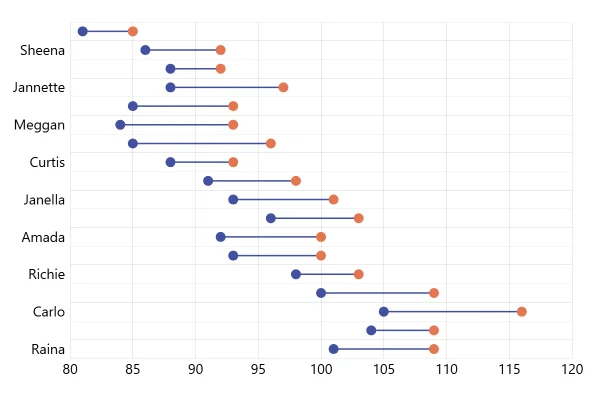
- The difference is the point: show it on its own, or use a dumbbell plot
- Many years: a line per series shows the trend better
- More than three series: the clusters get hard to read
For developers
Get the code.
Built with amCharts 5, a JavaScript library. The JavaScript includes your theme and renderer (canvas or SVG); the JSON also follows the changes you make with the controls.
For projects that use npm:
How it reads:
npm install @amcharts/amcharts5. See Getting started.
The same chart as a JSON config. Chart Maker reads and writes this format, the library's JSON parser turns it into a chart, and the <am5-chart> element puts it on a page with no code.How it reads:
"type" is the class to create and "settings" what you would pass to its new() in code; "properties" fill in its parts, lists such as series and axes or templates such as columns.template; "refs" holds objects used in more than one place ("#series-0" stands for the one named series-0); a string starting with "@" takes a value from another object, such as "@series.get('fill')".
A complete page. Save it as an .html file and open it in a browser.
Paste this into an AI coding assistant to build the chart from scratch. More in amCharts & AI.
// Create root element
// https://docs.amcharts.com/v5/getting-started/#root-element
var root = am5.Root.new("chartdiv");

// Set themes
// https://docs.amcharts.com/v5/concepts/themes/
root.setThemes([
  am5themes_Animated.new(root),
  am5themes_Responsive.new(root)
]);

// Create chart
// https://docs.amcharts.com/v5/charts/xy-chart/
var chart = root.container.children.push(am5xy.XYChart.new(root, {
  panX: false,                // the plot doesn't pan when dragged
  panY: false,
  wheelX: "panX",             // a horizontal wheel or trackpad swipe pans the values
  wheelY: "zoomX",            // the vertical wheel zooms in on the values
  paddingLeft:0,              // the year labels sit at the chart's left edge
  layout: root.verticalLayout // the legend on top, the plot under it
}));

// Data
var data = [{
  year: "2021",
  income: 23.5,
  expenses: 18.1
}, {
  year: "2022",
  income: 26.2,
  expenses: 22.8
}, {
  year: "2023",
  income: 30.1,
  expenses: 23.9
}, {
  year: "2024",
  income: 29.5,
  expenses: 25.1
}, {
  year: "2025",
  income: 24.6,
  expenses: 25
}];

// Create axes
// https://docs.amcharts.com/v5/charts/xy-chart/axes/
var yAxis = chart.yAxes.push(am5xy.CategoryAxis.new(root, {
  categoryField: "year",
  renderer: am5xy.AxisRendererY.new(root, {
    // the first year at the top
    inversed: true,
    // the gap between years: each year's pair of bars takes the middle 80% of its row
    cellStartLocation: 0.1,
    cellEndLocation: 0.9,
    minorGridEnabled: true // a grid line for every year, even one whose label is skipped
  })
}));

yAxis.data.setAll(data);

var xAxis = chart.xAxes.push(am5xy.ValueAxis.new(root, {
  renderer: am5xy.AxisRendererX.new(root, {
    strokeOpacity: 0.1, // a faint axis line
    minGridDistance: 50 // at least 50px between labels; on narrow screens some are skipped
  }),
  min: 0 // the bars start at zero
}));

// Add series
// https://docs.amcharts.com/v5/charts/xy-chart/series/
function createSeries(field, name) {
  var series = chart.series.push(am5xy.ColumnSeries.new(root, {
    name: name,
    xAxis: xAxis,
    yAxis: yAxis,
    valueXField: field,
    categoryYField: "year",
    sequencedInterpolation: true, // the bars grow one after another
    tooltip: am5.Tooltip.new(root, {
      pointerOrientation: "horizontal", // the tooltip points sideways at the bar
      // the series name in bold, then the year and the value
      labelText: "[bold]{name}[/]\n{categoryY}: {valueX}"
    })
  }));

  series.columns.template.setAll({
    height: am5.p100, // a year's two bars fill its cell, touching
    strokeOpacity: 0  // no outline
  });

  // two labels at the end of each bar: the value just outside it, the series name inside it
  series.bullets.push(function () {
    return am5.Bullet.new(root, {
      locationX: 1,   // at the end of the bar...
      locationY: 0.5, // ...halfway across it
      sprite: am5.Label.new(root, {
        centerY: am5.p50,  // level with the bar
        text: "{valueX}",  // the value, starting just past the bar's end
        populateText: true // fill in {valueX} from the data item
      })
    });
  });

  series.bullets.push(function () {
    return am5.Bullet.new(root, {
      locationX: 1,
      locationY: 0.5,
      sprite: am5.Label.new(root, {
        centerX: am5.p100, // the name ends at the bar's end, inside it
        centerY: am5.p50,
        text: "{name}",    // the series name
        // the theme's text color for labels on a colored fill
        fill: root.interfaceColors.get("alternativeText"),
        populateText: true // fill in {name}
      })
    });
  });

  series.data.setAll(data);
  series.appear();

  return series;
}

createSeries("income", "Income");
createSeries("expenses", "Expenses");

// Add legend, above the plot
// https://docs.amcharts.com/v5/charts/xy-chart/legend-xy-series/
var legend = chart.children.unshift(am5.Legend.new(root, {
  centerX: am5.p50, // the legend's middle...
  x: am5.p50,       // ...at the middle of the chart
  marginBottom: 10  // space between the legend and the plot
}));

legend.data.setAll(chart.series.values);

// Add cursor
// https://docs.amcharts.com/v5/charts/xy-chart/cursor/
var cursor = chart.set("cursor", am5xy.XYCursor.new(root, {
  // drag up or down across the plot to zoom into those years
  behavior: "zoomY"
}));
cursor.lineY.set("forceHidden", true); // no cursor lines
cursor.lineX.set("forceHidden", true);

// Make stuff animate on load
// https://docs.amcharts.com/v5/concepts/animations/
chart.appear(1000, 100);
{
"type": "XYChart",
"settings": {
"panX": false,
"panY": false,
"wheelX": "panX",
"wheelY": "zoomX",
"paddingLeft": 0,
"layout": {
"type": "VerticalLayout"
},
"cursor": {
"type": "XYCursor",
"settings": {
"behavior": "zoomY"
},
"properties": {
"lineX": {
"settings": {
"forceHidden": true
}
},
"lineY": {
"settings": {
"forceHidden": true
}
}
}
}
},
"properties": {
"series": [
"#series-0",
"#series-1"
],
"xAxes": [
"#axis-0"
],
"yAxes": [
"#axis-1"
]
},
"children": [
{
"type": "Legend",
"settings": {
"centerX": {
"type": "Percent",
"value": 50
},
"x": {
"type": "Percent",
"value": 50
},
"marginBottom": 10
},
"properties": {
"data": [
"#series-0",
"#series-1"
]
},
"index": 0
}
],
"refs": [
{
"data-0": [
{
"year": "2021",
"income": 23.5,
"expenses": 18.1
},
{
"year": "2022",
"income": 26.2,
"expenses": 22.8
},
{
"year": "2023",
"income": 30.1,
"expenses": 23.9
},
{
"year": "2024",
"income": 29.5,
"expenses": 25.1
},
{
"year": "2025",
"income": 24.6,
"expenses": 25
}
]
},
{
"axis-0": {
"type": "ValueAxis",
"settings": {
"renderer": {
"type": "AxisRendererX",
"settings": {
"strokeOpacity": 0.1,
"minGridDistance": 50
}
},
"min": 0
}
}
},
{
"axis-1": {
"type": "CategoryAxis",
"settings": {
"categoryField": "year",
"renderer": {
"type": "AxisRendererY",
"settings": {
"inversed": true,
"cellStartLocation": 0.1,
"cellEndLocation": 0.9,
"minorGridEnabled": true
}
}
},
"properties": {
"data": "#data-0"
}
}
},
{
"series-0": {
"type": "ColumnSeries",
"settings": {
"name": "Income",
"xAxis": "#axis-0",
"yAxis": "#axis-1",
"valueXField": "income",
"categoryYField": "year",
"sequencedInterpolation": true,
"tooltip": {
"type": "Tooltip",
"settings": {
"pointerOrientation": "horizontal",
"labelText": "[bold]{name}[/]\n{categoryY}: {valueX}"
}
}
},
"properties": {
"data": "#data-0",
"columns": {
"properties": {
"template": {
"settings": {
"height": {
"type": "Percent",
"value": 100
},
"strokeOpacity": 0
}
}
}
},
"bullets": [
{
"type": "Bullet",
"settings": {
"locationX": 1,
"locationY": 0.5,
"sprite": {
"type": "Label",
"settings": {
"centerY": {
"type": "Percent",
"value": 50
},
"text": "{valueX}",
"populateText": true
}
}
}
},
{
"type": "Bullet",
"settings": {
"locationX": 1,
"locationY": 0.5,
"sprite": {
"type": "Label",
"settings": {
"centerX": {
"type": "Percent",
"value": 100
},
"centerY": {
"type": "Percent",
"value": 50
},
"text": "{name}",
"fill": "@root.interfaceColors.get('alternativeText')",
"populateText": true
}
}
}
}
]
}
}
},
{
"series-1": {
"type": "ColumnSeries",
"settings": {
"name": "Expenses",
"xAxis": "#axis-0",
"yAxis": "#axis-1",
"valueXField": "expenses",
"categoryYField": "year",
"sequencedInterpolation": true,
"tooltip": {
"type": "Tooltip",
"settings": {
"pointerOrientation": "horizontal",
"labelText": "[bold]{name}[/]\n{categoryY}: {valueX}"
}
}
},
"properties": {
"data": "#data-0",
"columns": {
"properties": {
"template": {
"settings": {
"height": {
"type": "Percent",
"value": 100
},
"strokeOpacity": 0
}
}
}
},
"bullets": [
{
"type": "Bullet",
"settings": {
"locationX": 1,
"locationY": 0.5,
"sprite": {
"type": "Label",
"settings": {
"centerY": {
"type": "Percent",
"value": 50
},
"text": "{valueX}",
"populateText": true
}
}
}
},
{
"type": "Bullet",
"settings": {
"locationX": 1,
"locationY": 0.5,
"sprite": {
"type": "Label",
"settings": {
"centerX": {
"type": "Percent",
"value": 100
},
"centerY": {
"type": "Percent",
"value": 50
},
"text": "{name}",
"fill": "@root.interfaceColors.get('alternativeText')",
"populateText": true
}
}
}
}
]
}
}
}
]
}