Drill-Down Sunburst Chart
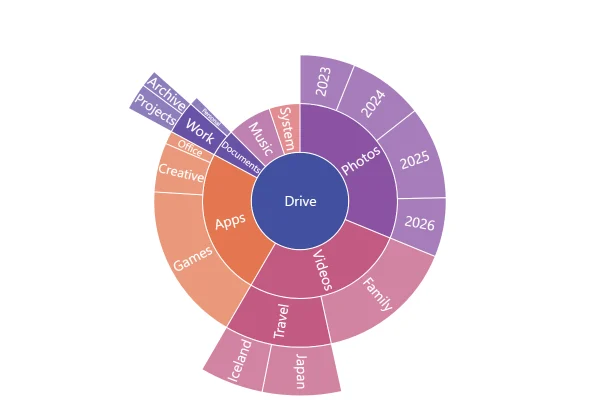
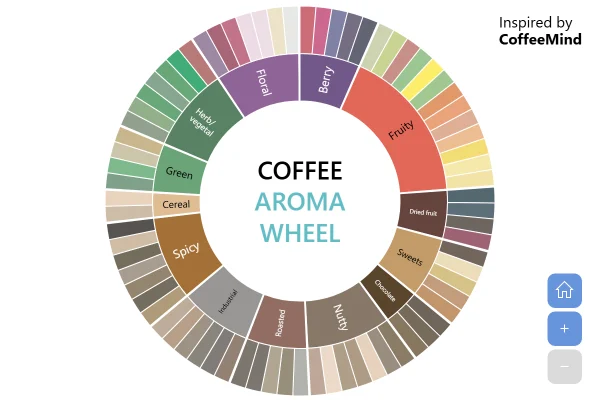
A sunburst you explore one branch at a time: click a category and it becomes the inner ring, with its own breakdown around it. Here, a year of an online store’s sales.
About this chart
When to drill down
A drill-down keeps the first view to the main categories and lets people open the one they care about. Each click redraws that branch around the hole at full size, so small items get room for their names, and the breadcrumbs show the way back.
Good for
- Sales by department, category and product
- Budgets or org charts with several levels
- Dashboards where people dig into one area
Think twice when
- Comparing parts of different branches: a grouped bar chart is clearer
- Printed reports, where nobody can click
- Two levels or fewer: a nested donut chart does the job
For developers
Get the code.
Built with amCharts 5, a JavaScript library. The JavaScript includes your theme and renderer (canvas or SVG); the JSON also follows the changes you make with the controls.
For projects that use npm:
How it reads:
npm install @amcharts/amcharts5. See Getting started.
The same chart as a JSON config. Chart Maker reads and writes this format, the library's JSON parser turns it into a chart, and the <am5-chart> element puts it on a page with no code.How it reads:
"type" is the class to create and "settings" what you would pass to its new() in code; "properties" fill in its parts, lists such as series and axes or templates such as columns.template; "refs" holds objects used in more than one place ("#series-0" stands for the one named series-0); a string starting with "@" takes a value from another object, such as "@series.get('fill')".
A complete page. Save it as an .html file and open it in a browser.
Paste this into an AI coding assistant to build the chart from scratch. More in amCharts & AI.
// Create root element
// https://docs.amcharts.com/v5/getting-started/#root-element
var root = am5.Root.new("chartdiv");

// Set themes
// https://docs.amcharts.com/v5/concepts/themes/
root.setThemes([
  am5themes_Animated.new(root),
  am5themes_Responsive.new(root)
]);

// Create wrapper container
var chart = root.container.children.push(am5.SerialChartContainer.new(root, {
  width: am5.percent(100),    // fills the whole chart area
  height: am5.percent(100),
  layout: root.verticalLayout // the breadcrumbs above the sunburst
}));

// Create series
// https://docs.amcharts.com/v5/charts/hierarchy/#adding
var series = chart.series.push(am5hierarchy.Sunburst.new(root, {
  singleBranchOnly: true,       // opening a branch closes the others
  // show every level, on load and after a click (10 is more levels than the data has)
  downDepth: 10,
  initialDepth: 10,
  // the root, "All sales", isn't drawn: its children form the inner ring
  topDepth: 1,
  innerRadius: am5.percent(30), // a hole in the middle, 30% of the radius
  valueField: "value",
  categoryField: "name",
  childDataField: "children"
}));

// Sales are in thousands of dollars; {sum} adds up everything inside a category
series.nodes.template.set("tooltipText", "{category}: [bold]${sum}k[/]");

// Breadcrumbs above the chart show where you are and lead back up
// https://docs.amcharts.com/v5/charts/hierarchy/breadcrumbs/
chart.children.unshift(am5hierarchy.BreadcrumbBar.new(root, {
  series: series
}));

// Set data: a year of an online store's sales, in thousands of dollars
// https://docs.amcharts.com/v5/charts/hierarchy/#setting-data
series.data.setAll([{
  name: "All sales",
  children: [{
    name: "Electronics",
    children: [
      {
        name: "Phones",
        children: [
          { name: "Handsets", value: 130 },
          { name: "Chargers", value: 87 },
          { name: "Cases", value: 55 }
        ]
      },
      { name: "Laptops", value: 148 },
      {
        name: "Audio",
        children: [
          { name: "Headphones", value: 53 },
          { name: "Speakers", value: 30 }
        ]
      },
      { name: "Cameras", value: 26 }
    ]
  }, {
    name: "Home",
    children: [
      { name: "Furniture", value: 415 },
      { name: "Kitchen", value: 148 },
      { name: "Bedding", value: 89 }
    ]
  }, {
    name: "Fashion",
    children: [
      {
        name: "Shoes",
        children: [
          { name: "Sneakers", value: 89 },
          { name: "Boots", value: 40 },
          { name: "Sandals", value: 33 }
        ]
      },
      { name: "Clothing", value: 148 }
    ]
  }, {
    name: "Toys",
    children: [
      { name: "Board games", value: 135 },
      { name: "Building sets", value: 98 }
    ]
  }, {
    name: "Books",
    children: [
      { name: "Fiction", value: 100 },
      { name: "Nonfiction", value: 60 }
    ]
  }]
}]);

series.selectDataItem(series.dataItems[0]); // select the root, so the breadcrumbs show "All sales"

// Make stuff animate on load
series.appear(1000, 100);
{
"type": "SerialChartContainer",
"settings": {
"width": {
"type": "Percent",
"value": 100
},
"height": {
"type": "Percent",
"value": 100
},
"layout": {
"type": "VerticalLayout"
}
},
"properties": {
"series": [
"#series-0"
]
},
"children": [
{
"type": "BreadcrumbBar",
"settings": {
"series": "#series-0"
},
"index": 0
}
],
"refs": [
{
"data-0": [
{
"name": "All sales",
"children": [
{
"name": "Electronics",
"children": [
{
"name": "Phones",
"children": [
{
"name": "Handsets",
"value": 130
},
{
"name": "Chargers",
"value": 87
},
{
"name": "Cases",
"value": 55
}
],
"__parse": true
},
{
"name": "Laptops",
"value": 148
},
{
"name": "Audio",
"children": [
{
"name": "Headphones",
"value": 53
},
{
"name": "Speakers",
"value": 30
}
],
"__parse": true
},
{
"name": "Cameras",
"value": 26
}
],
"__parse": true
},
{
"name": "Home",
"children": [
{
"name": "Furniture",
"value": 415
},
{
"name": "Kitchen",
"value": 148
},
{
"name": "Bedding",
"value": 89
}
],
"__parse": true
},
{
"name": "Fashion",
"children": [
{
"name": "Shoes",
"children": [
{
"name": "Sneakers",
"value": 89
},
{
"name": "Boots",
"value": 40
},
{
"name": "Sandals",
"value": 33
}
],
"__parse": true
},
{
"name": "Clothing",
"value": 148
}
],
"__parse": true
},
{
"name": "Toys",
"children": [
{
"name": "Board games",
"value": 135
},
{
"name": "Building sets",
"value": 98
}
],
"__parse": true
},
{
"name": "Books",
"children": [
{
"name": "Fiction",
"value": 100
},
{
"name": "Nonfiction",
"value": 60
}
],
"__parse": true
}
],
"__parse": true
}
]
},
{
"series-0": {
"type": "Sunburst",
"settings": {
"singleBranchOnly": true,
"downDepth": 10,
"initialDepth": 10,
"topDepth": 1,
"innerRadius": {
"type": "Percent",
"value": 30
},
"valueField": "value",
"categoryField": "name",
"childDataField": "children",
"selectedDataItem": "@self.dataItems.0"
},
"properties": {
"data": "#data-0",
"nodes": {
"properties": {
"template": {
"settings": {
"tooltipText": "{category}: [bold]${sum}k[/]"
}
}
}
}
}
}
}
]
}