Process Control Chart
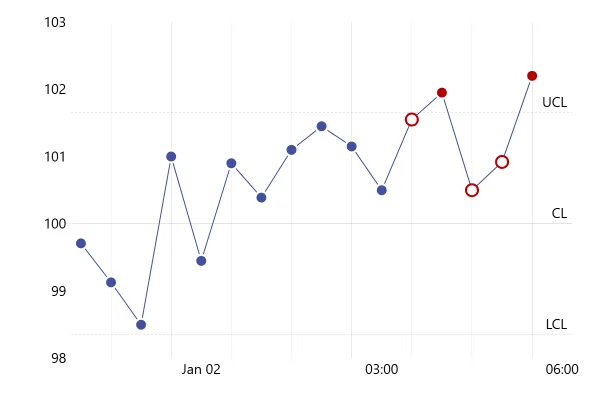
A process control chart: 23 samples against an upper and a lower limit, with the zone between them shaded. Three fall outside, the signal to look for a cause.
About this chart
When to shade the limits
Shading the space between the limits turns the chart into a simple test: inside the band is normal variation, outside it is a signal. That reads at a glance on a wall screen or in a report, even for people who never learned the rules of process control.
Good for
- Shop-floor and wall-screen dashboards
- Quality reports for non-specialists
- Any safe range: temperature, pressure, stock levels
Think twice when
- Limits that change over time: draw them as series from your data
- Several processes at once: give each its own small chart
- Subtle drifts inside the band: flag runs of points too
For developers
Get the code.
Built with amCharts 5, a JavaScript library. The JavaScript includes your theme and renderer (canvas or SVG); the JSON also follows the changes you make with the controls.
For projects that use npm:
How it reads:
npm install @amcharts/amcharts5. See Getting started.
The same chart as a JSON config. Chart Maker reads and writes this format, the library's JSON parser turns it into a chart, and the <am5-chart> element puts it on a page with no code.How it reads:
"type" is the class to create and "settings" what you would pass to its new() in code; "properties" fill in its parts, lists such as series and axes or templates such as columns.template; "refs" holds objects used in more than one place ("#series-0" stands for the one named series-0); a string starting with "@" takes a value from another object, such as "@series.get('fill')".
A complete page. Save it as an .html file and open it in a browser.
Paste this into an AI coding assistant to build the chart from scratch. More in amCharts & AI.
// Create root element
// https://docs.amcharts.com/v5/getting-started/#root-element
var root = am5.Root.new("chartdiv");

// Set themes
// https://docs.amcharts.com/v5/concepts/themes/
root.setThemes([
  am5themes_Animated.new(root),
  am5themes_Responsive.new(root)
]);

var data = [
  { x: 1, value: 14 },
  { x: 2, value: 11 },
  { x: 3, value: 12 },
  { x: 4, value: 14 },
  { x: 5, value: 11 },
  { x: 6, value: 11 },
  { x: 7, value: 12 },
  { x: 8, value: 12 },
  { x: 9, value: 13 },
  { x: 10, value: 15 },
  { x: 11, value: 19 },
  { x: 12, value: 21 },
  { x: 13, value: 22 },
  { x: 14, value: 20 },
  { x: 15, value: 18 },
  { x: 16, value: 14 },
  { x: 17, value: 16 },
  { x: 18, value: 18 },
  { x: 19, value: 17 },
  { x: 20, value: 15 },
  { x: 21, value: 12 },
  { x: 22, value: 8 },
  { x: 23, value: 11 }
];

// Create chart
// https://docs.amcharts.com/v5/charts/xy-chart/
var chart = root.container.children.push(
  am5xy.XYChart.new(root, {
    panX: true,     // drag the plot to pan sideways...
    panY: true,     // ...and up and down
    wheelX: "panX", // a horizontal wheel or trackpad swipe pans...
    wheelY: "zoomX" // ...and the vertical wheel zooms in along x
  })
);

// Create axes
// https://docs.amcharts.com/v5/charts/xy-chart/axes/
var xAxis = chart.xAxes.push(
  am5xy.ValueAxis.new(root, {
    renderer: am5xy.AxisRendererX.new(root, {
      minGridDistance: 50 // at least 50px between the x labels
    }),
    tooltip: am5.Tooltip.new(root, {}) // shows the x value under the cursor on the axis
  })
);

var yAxis = chart.yAxes.push(
  am5xy.ValueAxis.new(root, {
    renderer: am5xy.AxisRendererY.new(root, {})
  })
);

// Add series
// https://docs.amcharts.com/v5/charts/xy-chart/series/
var series = chart.series.push(
  am5xy.LineSeries.new(root, {
    // bullets hide when points get closer than 10px, so they don't crowd a zoomed-out line
    minBulletDistance: 10,
    xAxis: xAxis,
    yAxis: yAxis,
    valueYField: "value",
    valueXField: "x",
    tooltip: am5.Tooltip.new(root, {
      pointerOrientation: "horizontal", // the tooltip sits beside the point, not above it
      labelText: "{valueY}"             // just the value
    })
  })
);

series.strokes.template.setAll({
  strokeWidth: 3 // a 3px line
});

series.data.setAll(data);

// All bullets share one template, so setting its radius resizes them at once
var bulletTemplate = am5.Template.new({
  radius: 6
});

// a dot on every point
series.bullets.push(function () {
  return am5.Bullet.new(root, {
    sprite: am5.Circle.new(root, {
      fill: series.get("fill"), // the series color
      stroke: root.interfaceColors.get("background"), // a ring in the background color...
      strokeWidth: 2 // ...2px wide, sets each dot off the line
    }, bulletTemplate)
  });
});

// Add cursor
// https://docs.amcharts.com/v5/charts/xy-chart/cursor/
var cursor = chart.set("cursor", am5xy.XYCursor.new(root, {
  xAxis: xAxis
}));
cursor.lineY.set("visible", false); // only the vertical cursor line, no horizontal one

// add scrollbar
chart.set("scrollbarX", am5.Scrollbar.new(root, {
  orientation: "horizontal" // a scrollbar along the top, to zoom in on part of the line
}));

// Make stuff animate on load
// https://docs.amcharts.com/v5/concepts/animations/
series.appear(1000, 100);
chart.appear(1000, 100);

// Function to add process control ranges
function addLimits(lower, upper) {
  // Colors from the theme, so the chart follows the theme
  var colors = chart.get("colors");

  // Add range fill
  createRange(lower, upper, undefined, colors.getIndex(4));

  // Add upper/average/lower lines
  var lowerRange = createRange(lower, undefined, "Lower control limit", colors.getIndex(10));
  createRange(upper, undefined, "Upper control limit", colors.getIndex(10));
  createRange(lower + (upper - lower) / 2, undefined, "Process average", colors.getIndex(10), true);

  // The lower label goes under its line, clear of the data inside the limits
  lowerRange.get("label").set("centerY", am5.p0);
}

addLimits(10, 20);

// an axis range: a filled band when it has an end value, otherwise a line, with an optional label
function createRange(value, endValue, label, color, dashed) {
  var rangeDataItem = yAxis.makeDataItem({
    value: value,
    endValue: endValue
  });

  var range = yAxis.createAxisRange(rangeDataItem);

  if (endValue) {
    range.get("axisFill").setAll({
      fill: color,
      fillOpacity: 0.2, // a light band between the limits
      visible: true     // an axis range's fill is hidden until set visible
    });
  }
  else {
    range.get("grid").setAll({
      stroke: color,
      strokeOpacity: 1, // fully opaque, unlike the regular grid
      strokeWidth: 2,   // 2px wide
      location: 1,
      forceHidden: false // shown even with the regular grid hidden, whose template this grid copies
    });

    if (dashed) {
      range.get("grid").set("strokeDasharray", [5, 3]); // 5px dashes, 3px gaps
    }
  }

  if (label) {
    range.get("label").setAll({
      text: label,
      location: 1,
      fontSize: 19,    // large text, in pixels
      inside: true,    // inside the plot, not next to the axis
      centerX: am5.p0, // the label starts at the left edge of the plot and runs right
      // the label's bottom on the line, so the text sits just above it
      centerY: am5.p100
    });
  }

  return range;
}
{
"type": "XYChart",
"settings": {
"panX": true,
"panY": true,
"wheelX": "panX",
"wheelY": "zoomX",
"cursor": {
"type": "XYCursor",
"settings": {
"xAxis": "#axis-0"
},
"properties": {
"lineY": {
"settings": {
"visible": false
}
}
}
},
"scrollbarX": {
"type": "Scrollbar",
"settings": {
"orientation": "horizontal"
}
}
},
"properties": {
"series": [
"#series-0"
],
"xAxes": [
"#axis-0"
],
"yAxes": [
"#axis-1"
]
},
"refs": [
{
"data-0": [
{
"x": 1,
"value": 14
},
{
"x": 2,
"value": 11
},
{
"x": 3,
"value": 12
},
{
"x": 4,
"value": 14
},
{
"x": 5,
"value": 11
},
{
"x": 6,
"value": 11
},
{
"x": 7,
"value": 12
},
{
"x": 8,
"value": 12
},
{
"x": 9,
"value": 13
},
{
"x": 10,
"value": 15
},
{
"x": 11,
"value": 19
},
{
"x": 12,
"value": 21
},
{
"x": 13,
"value": 22
},
{
"x": 14,
"value": 20
},
{
"x": 15,
"value": 18
},
{
"x": 16,
"value": 14
},
{
"x": 17,
"value": 16
},
{
"x": 18,
"value": 18
},
{
"x": 19,
"value": 17
},
{
"x": 20,
"value": 15
},
{
"x": 21,
"value": 12
},
{
"x": 22,
"value": 8
},
{
"x": 23,
"value": 11
}
]
},
{
"template-0": {
"type": "Template",
"settings": {
"radius": 6
}
}
},
{
"axis-0": {
"type": "ValueAxis",
"settings": {
"renderer": {
"type": "AxisRendererX",
"settings": {
"minGridDistance": 50
}
},
"tooltip": {
"type": "Tooltip"
}
}
}
},
{
"axis-1": {
"type": "ValueAxis",
"settings": {
"renderer": {
"type": "AxisRendererY"
}
}
}
},
{
"series-0": {
"type": "LineSeries",
"settings": {
"minBulletDistance": 10,
"xAxis": "#axis-0",
"yAxis": "#axis-1",
"valueYField": "value",
"valueXField": "x",
"tooltip": {
"type": "Tooltip",
"settings": {
"pointerOrientation": "horizontal",
"labelText": "{valueY}"
}
}
},
"properties": {
"data": "#data-0",
"strokes": {
"properties": {
"template": {
"settings": {
"strokeWidth": 3
}
}
}
},
"bullets": [
{
"type": "Bullet",
"settings": {
"sprite": {
"type": "Circle",
"settings": {
"fill": "@series.get('fill')",
"stroke": "@root.interfaceColors.get('background')",
"strokeWidth": 2
},
"properties": {
"template": "#template-0"
}
}
}
}
]
}
}
},
{
"axisRange-0": {
"axis": "#axis-1",
"settings": {
"value": 10,
"endValue": 20,
"axisFill": {
"type": "Graphics",
"settings": {
"visible": true,
"fillOpacity": 0.2,
"fill": "@colors.getIndex(4)"
}
}
},
"__parseLogic": "axisRange"
}
},
{
"axisRange-1": {
"axis": "#axis-1",
"settings": {
"value": 10,
"label": {
"type": "AxisLabel",
"settings": {
"centerX": {
"type": "Percent",
"value": 0
},
"location": 1,
"centerY": {
"type": "Percent",
"value": 0
},
"fontSize": 19,
"text": "Lower control limit",
"inside": true
}
},
"grid": {
"type": "Grid",
"settings": {
"location": 1,
"strokeOpacity": 1,
"stroke": "@colors.getIndex(10)",
"strokeWidth": 2,
"forceHidden": false
}
}
},
"__parseLogic": "axisRange"
}
},
{
"axisRange-2": {
"axis": "#axis-1",
"settings": {
"value": 20,
"label": {
"type": "AxisLabel",
"settings": {
"centerX": {
"type": "Percent",
"value": 0
},
"location": 1,
"centerY": {
"type": "Percent",
"value": 100
},
"fontSize": 19,
"text": "Upper control limit",
"inside": true
}
},
"grid": {
"type": "Grid",
"settings": {
"location": 1,
"strokeOpacity": 1,
"stroke": "@colors.getIndex(10)",
"strokeWidth": 2,
"forceHidden": false
}
}
},
"__parseLogic": "axisRange"
}
},
{
"axisRange-3": {
"axis": "#axis-1",
"settings": {
"value": 15,
"label": {
"type": "AxisLabel",
"settings": {
"centerX": {
"type": "Percent",
"value": 0
},
"location": 1,
"centerY": {
"type": "Percent",
"value": 100
},
"fontSize": 19,
"text": "Process average",
"inside": true
}
},
"grid": {
"type": "Grid",
"settings": {
"location": 1,
"strokeOpacity": 1,
"stroke": "@colors.getIndex(10)",
"strokeWidth": 2,
"forceHidden": false,
"strokeDasharray": [5, 3]
}
}
},
"__parseLogic": "axisRange"
}
}
]
}