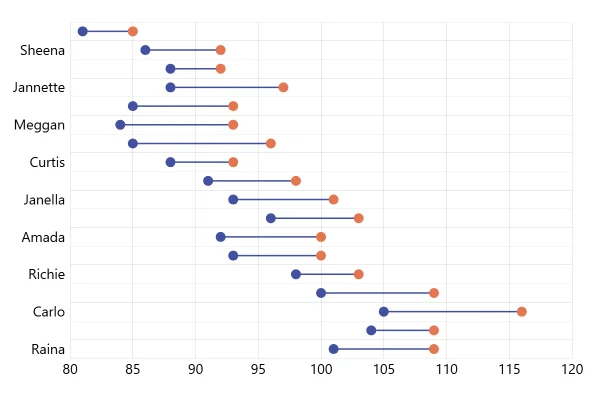
Dumbbell Plot
The dumbbell plot standing up: for each of 29 people, two dots on a vertical line, the lower one a start value and the upper one an end value. The longer the line, the bigger the change.
About this chart
Dumbbells standing up
Standing the dumbbells up suits categories that read left to right, such as months or a lineup of short names. With the names turned on their side, dozens fit across the chart, and the line lengths compare at a glance. For long names, lay the plot on its side.
Good for
- Change per month, store or team
- Dozens of short category names
- Ranges, like lowest and highest price
Think twice when
- Long names: the horizontal version gives them room
- Changes in both directions: color the rises and falls apart
- Many points in time: two lines show the trend better
For developers
Get the code.
Built with amCharts 5, a JavaScript library. The JavaScript includes your theme and renderer (canvas or SVG); the JSON also follows the changes you make with the controls.
For projects that use npm:
How it reads:
npm install @amcharts/amcharts5. See Getting started.
The same chart as a JSON config. Chart Maker reads and writes this format, the library's JSON parser turns it into a chart, and the <am5-chart> element puts it on a page with no code.How it reads:
"type" is the class to create and "settings" what you would pass to its new() in code; "properties" fill in its parts, lists such as series and axes or templates such as columns.template; "refs" holds objects used in more than one place ("#series-0" stands for the one named series-0); a string starting with "@" takes a value from another object, such as "@series.get('fill')".
A complete page. Save it as an .html file and open it in a browser.
Paste this into an AI coding assistant to build the chart from scratch. More in amCharts & AI.
// Create root element
// https://docs.amcharts.com/v5/getting-started/#root-element
var root = am5.Root.new("chartdiv");

// Set themes
// https://docs.amcharts.com/v5/concepts/themes/
root.setThemes([
  am5themes_Animated.new(root),
  am5themes_Responsive.new(root)
]);

// Create chart
// https://docs.amcharts.com/v5/charts/xy-chart/
var chart = root.container.children.push(am5xy.XYChart.new(root, {
  // a drag zooms (the cursor's behavior), so the chart itself doesn't pan
  panX: false,
  panY: false,
  wheelX: "panX",   // a horizontal wheel or trackpad swipe pans...
  wheelY: "zoomX",  // ...and the vertical wheel zooms in on the names
  pinchZoomX: true, // pinch with two fingers to zoom on touch screens
  paddingLeft: 0    // the value labels sit at the chart's left edge
}));

// Add cursor
// https://docs.amcharts.com/v5/charts/xy-chart/cursor/
var cursor = chart.set("cursor", am5xy.XYCursor.new(root, {
  // drag across the plot to zoom in on those names
  behavior: "zoomX"
}));
cursor.lineY.set("visible", false); // no horizontal cursor line

// Add scrollbar, hidden at first
// https://docs.amcharts.com/v5/charts/xy-chart/scrollbars/
chart.set("scrollbarX", am5.Scrollbar.new(root, { orientation: "horizontal", forceHidden: true }));

// Create axes
// https://docs.amcharts.com/v5/charts/xy-chart/axes/
var xRenderer = am5xy.AxisRendererX.new(root, {
  minGridDistance: 30 // at least 30px between names; on narrow screens some are skipped
});
xRenderer.labels.template.setAll({
  rotation: -90,    // the names read upward...
  centerY: am5.p50, // ...centered under their dumbbells...
  centerX: 0        // ...all starting at the same bottom line
});

xRenderer.grid.template.setAll({
  visible: false // no vertical grid lines
})

var xAxis = chart.xAxes.push(am5xy.CategoryAxis.new(root, {
  maxDeviation: 0,                   // no panning past the first or last name
  categoryField: "category",
  renderer: xRenderer,
  tooltip: am5.Tooltip.new(root, {}) // shows the hovered name on the axis
}));

var yAxis = chart.yAxes.push(am5xy.ValueAxis.new(root, {
  maxDeviation: 0,
  renderer: am5xy.AxisRendererY.new(root, {})
}));

// Create series
// https://docs.amcharts.com/v5/charts/xy-chart/series/
var series = chart.series.push(am5xy.ColumnSeries.new(root, {
  name: "Series 1",
  xAxis: xAxis,
  yAxis: yAxis,
  valueYField: "close",
  openValueYField: "open", // each column starts at its open value instead of at zero
  categoryXField: "category",
  tooltip: am5.Tooltip.new(root, {
    labelText: "{openValueY} to {valueY}" // both ends, as "93 to 99"
  })
}));
// a column half a pixel wide: the thin bar between the two dots
series.columns.template.setAll({
  width: 0.5
});

// The dots at each end share a template, so a change to it restyles them all
var startDot = am5.Template.new({
  scale: 1,
  fill: series.get("fill") // the start dots in the series' color...
});

var endDot = am5.Template.new({
  scale: 1,
  fill: chart.get("colors").getIndex(1) // ...the end dots in the next palette color
});

// Round bullets, styled by the template
series.bullets.push(function() {
  return am5.Bullet.new(root, {
    // 0 puts this dot at the column's open value; the second bullet's 1, at its close value
    locationY: 0,
    sprite: am5.Circle.new(root, { radius: 5 }, startDot) // 5px radius, styled by the startDot template
  });
});
series.bullets.push(function() {
  return am5.Bullet.new(root, {
    locationY: 1,
    sprite: am5.Circle.new(root, { radius: 5 }, endDot)
  });
});

// Set data
var data = [];
var open = 100;
var close = 120;

var names = ["Raina",
  "Demarcus",
  "Carlo",
  "Jacinda",
  "Richie",
  "Antony",
  "Amada",
  "Idalia",
  "Janella",
  "Marla",
  "Curtis",
  "Shellie",
  "Meggan",
  "Nathanael",
  "Jannette",
  "Tyrell",
  "Sheena",
  "Maranda",
  "Briana",
  "Rosa",
  "Rosanne",
  "Herman",
  "Wayne",
  "Shamika",
  "Suk",
  "Clair",
  "Olivia",
  "Hans",
  "Glennie"
];

// random ranges: each start drifts a little from the last, each range spans 3 to 13
for (var i = 0; i < names.length; i++) {
  open += Math.round((Math.random() < 0.5 ? 1 : -1) * Math.random() * 5);
  close = open + Math.round(Math.random() * 10) + 3;
  data.push({
    category: names[i],
    open: open,
    close: close
  });
}

xAxis.data.setAll(data);
series.data.setAll(data);

// Make stuff animate on load
// https://docs.amcharts.com/v5/concepts/animations/
series.appear(1000);
chart.appear(1000, 100);
{
"type": "XYChart",
"settings": {
"panX": false,
"panY": false,
"wheelX": "panX",
"wheelY": "zoomX",
"pinchZoomX": true,
"paddingLeft": 0,
"cursor": {
"type": "XYCursor",
"settings": {
"behavior": "zoomX"
},
"properties": {
"lineY": {
"settings": {
"visible": false
}
}
}
},
"scrollbarX": {
"type": "Scrollbar",
"settings": {
"orientation": "horizontal",
"forceHidden": true
}
}
},
"properties": {
"series": [
"#series-0"
],
"xAxes": [
"#axis-0"
],
"yAxes": [
"#axis-1"
]
},
"refs": [
{
"data-0": [
{
"category": "Raina",
"open": 100,
"close": 104
},
{
"category": "Demarcus",
"open": 99,
"close": 103
},
{
"category": "Carlo",
"open": 100,
"close": 105
},
{
"category": "Jacinda",
"open": 97,
"close": 108
},
{
"category": "Richie",
"open": 93,
"close": 104
},
{
"category": "Antony",
"open": 97,
"close": 107
},
{
"category": "Amada",
"open": 100,
"close": 105
},
{
"category": "Idalia",
"open": 95,
"close": 107
},
{
"category": "Janella",
"open": 98,
"close": 111
},
{
"category": "Marla",
"open": 96,
"close": 105
},
{
"category": "Curtis",
"open": 96,
"close": 104
},
{
"category": "Shellie",
"open": 93,
"close": 98
},
{
"category": "Meggan",
"open": 91,
"close": 95
},
{
"category": "Nathanael",
"open": 93,
"close": 102
},
{
"category": "Jannette",
"open": 90,
"close": 94
},
{
"category": "Tyrell",
"open": 88,
"close": 96
},
{
"category": "Sheena",
"open": 90,
"close": 95
},
{
"category": "Maranda",
"open": 93,
"close": 103
},
{
"category": "Briana",
"open": 88,
"close": 98
},
{
"category": "Rosa",
"open": 89,
"close": 93
},
{
"category": "Rosanne",
"open": 88,
"close": 93
},
{
"category": "Herman",
"open": 87,
"close": 91
},
{
"category": "Wayne",
"open": 90,
"close": 94
},
{
"category": "Shamika",
"open": 89,
"close": 99
},
{
"category": "Suk",
"open": 93,
"close": 103
},
{
"category": "Clair",
"open": 92,
"close": 100
},
{
"category": "Olivia",
"open": 96,
"close": 102
},
{
"category": "Hans",
"open": 95,
"close": 104
},
{
"category": "Glennie",
"open": 99,
"close": 103
}
]
},
{
"template-0": {
"type": "Template",
"settings": {
"scale": 1,
"fill": "@root.interfaceColors.get('primaryButton')"
}
}
},
{
"template-1": {
"type": "Template",
"settings": {
"scale": 1,
"fill": "@colors.getIndex(1)"
}
}
},
{
"axis-0": {
"type": "CategoryAxis",
"settings": {
"maxDeviation": 0,
"categoryField": "category",
"renderer": {
"type": "AxisRendererX",
"settings": {
"minGridDistance": 30
},
"properties": {
"labels": {
"properties": {
"template": {
"settings": {
"rotation": -90,
"centerY": {
"type": "Percent",
"value": 50
},
"centerX": 0
}
}
}
},
"grid": {
"properties": {
"template": {
"settings": {
"visible": false
}
}
}
}
}
},
"tooltip": {
"type": "Tooltip"
}
},
"properties": {
"data": "#data-0"
}
}
},
{
"axis-1": {
"type": "ValueAxis",
"settings": {
"maxDeviation": 0,
"renderer": {
"type": "AxisRendererY"
}
}
}
},
{
"series-0": {
"type": "ColumnSeries",
"settings": {
"name": "Series 1",
"xAxis": "#axis-0",
"yAxis": "#axis-1",
"valueYField": "close",
"openValueYField": "open",
"categoryXField": "category",
"tooltip": {
"type": "Tooltip",
"settings": {
"labelText": "{openValueY} to {valueY}"
}
}
},
"properties": {
"data": "#data-0",
"columns": {
"properties": {
"template": {
"settings": {
"width": 0.5
}
}
}
},
"bullets": [
{
"type": "Bullet",
"settings": {
"locationY": 0,
"sprite": {
"type": "Circle",
"settings": {
"radius": 5
},
"properties": {
"template": "#template-0"
}
}
}
},
{
"type": "Bullet",
"settings": {
"locationY": 1,
"sprite": {
"type": "Circle",
"settings": {
"radius": 5
},
"properties": {
"template": "#template-1"
}
}
}
}
]
}
}
}
]
}