Column Chart with Images on Top
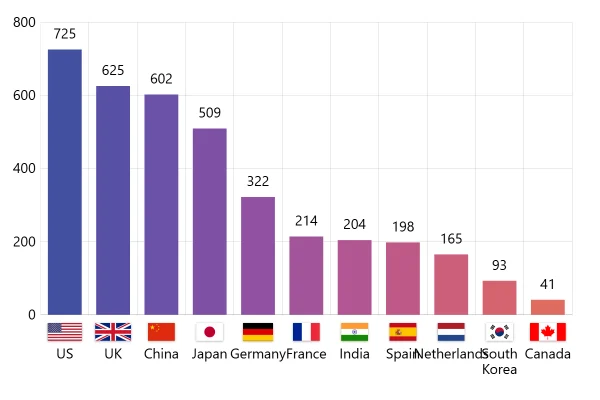
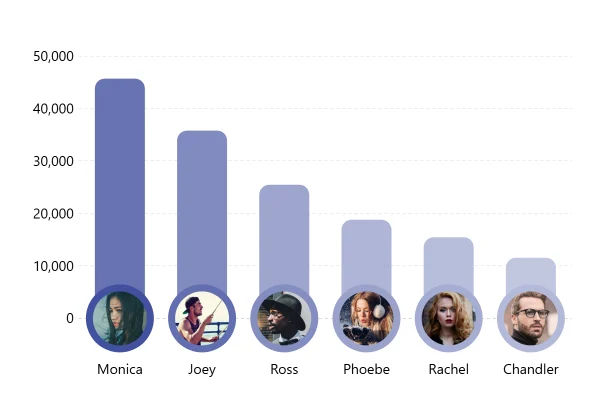
A column chart with a face on top of each column, so the chart reads as people, not just numbers. Each picture’s address comes from the data, next to its value.
About this chart
When faces help a chart
A face or logo on top of each column tells the reader who it is before they look down at the axis, and it makes a ranking feel personal. The address of each picture sits in the data next to its value, so any image can go there.
Good for
- Sales or scores by person
- Brands with logos, teams with badges
- Leaderboards and social posts
Think twice when
- More than about eight columns: the pictures overlap
- Values close together: add value labels, the faces won’t show the difference
- Formal reports: the pictures can look playful
For developers
Get the code.
Built with amCharts 5, a JavaScript library. The JavaScript includes your theme and renderer (canvas or SVG); the JSON also follows the changes you make with the controls.
For projects that use npm:
How it reads:
npm install @amcharts/amcharts5. See Getting started.
The same chart as a JSON config. Chart Maker reads and writes this format, the library's JSON parser turns it into a chart, and the <am5-chart> element puts it on a page with no code.How it reads:
"type" is the class to create and "settings" what you would pass to its new() in code; "properties" fill in its parts, lists such as series and axes or templates such as columns.template; "refs" holds objects used in more than one place ("#series-0" stands for the one named series-0); a string starting with "@" takes a value from another object, such as "@series.get('fill')".
A complete page. Save it as an .html file and open it in a browser.
Paste this into an AI coding assistant to build the chart from scratch. More in amCharts & AI.
// Create root element
// https://www.amcharts.com/docs/v5/getting-started/#Root_element
var root = am5.Root.new("chartdiv");

// Set themes
// https://www.amcharts.com/docs/v5/concepts/themes/
root.setThemes([
  am5themes_Animated.new(root),
  am5themes_Responsive.new(root)
]);

// Create chart
// https://www.amcharts.com/docs/v5/charts/xy-chart/
var chart = root.container.children.push(am5xy.XYChart.new(root, {
  panX: false,    // the plot doesn't pan when dragged
  panY: false,
  wheelX: "none", // the mouse wheel scrolls the page
  wheelY: "none",
  paddingLeft: 0  // the value labels sit at the chart's left edge
}));

// Add cursor
// https://www.amcharts.com/docs/v5/charts/xy-chart/cursor/
var cursor = chart.set("cursor", am5xy.XYCursor.new(root, {}));
cursor.lineY.set("visible", false); // no horizontal cursor line, only the vertical one

// Create axes
// https://www.amcharts.com/docs/v5/charts/xy-chart/axes/
var xRenderer = am5xy.AxisRendererX.new(root, {
  minGridDistance: 30, // a label for every name down to 30px apart
  minorGridEnabled: true
 });

var xAxis = chart.xAxes.push(am5xy.CategoryAxis.new(root, {
  maxDeviation: 0,                   // no panning past the first and last name
  categoryField: "name",
  renderer: xRenderer,
  tooltip: am5.Tooltip.new(root, {}) // the cursor shows the name on the axis
}));

xRenderer.grid.template.set("visible", false); // no vertical grid lines

var yRenderer = am5xy.AxisRendererY.new(root, {});
var yAxis = chart.yAxes.push(am5xy.ValueAxis.new(root, {
  maxDeviation: 0, // no panning past the ends of the scale
  min: 0,          // the columns start at zero
  // 10% of room above the tallest column, for its photo
  extraMax: 0.1,
  renderer: yRenderer
}));

yRenderer.grid.template.setAll({
  strokeDasharray: [2, 2] // dashed grid lines: 2px dash, 2px gap
});

// the vertical grid lines get the same dash, for when they are shown
xRenderer.grid.template.set("strokeDasharray", [2, 2]);

// Create series
// https://www.amcharts.com/docs/v5/charts/xy-chart/series/
var series = chart.series.push(am5xy.ColumnSeries.new(root, {
  name: "Series 1",
  xAxis: xAxis,
  yAxis: yAxis,
  valueYField: "value",
  sequencedInterpolation: true, // the columns grow one after another
  categoryXField: "name",
  // the tooltip moves up 25px, clear of the photo
  tooltip: am5.Tooltip.new(root, { dy: -25, labelText: "{valueY}" }),
  // Each column takes its own color from the series palette
  colorByDataItem: true
}));

series.columns.template.setAll({
  cornerRadiusTL: 5, // rounded top corners
  cornerRadiusTR: 5,
  strokeOpacity: 0   // no outline
});

// Set data
var data = [
  {
    name: "John",
    value: 35654,
    bulletSettings: { src: "https://www.amcharts.com/lib/images/faces/A04.png" }
  },
  {
    name: "Damon",
    value: 65456,
    bulletSettings: { src: "https://www.amcharts.com/lib/images/faces/C02.png" }
  },
  {
    name: "Patrick",
    value: 45724,
    bulletSettings: { src: "https://www.amcharts.com/lib/images/faces/D02.png" }
  },
  {
    name: "Mark",
    value: 13654,
    bulletSettings: { src: "https://www.amcharts.com/lib/images/faces/E01.png" }
  }
];

// a photo centered on the top of each column, its address taken from the data's bulletSettings
series.bullets.push(function() {
  return am5.Bullet.new(root, {
    locationY: 1, // at the top of the column
    sprite: am5.Picture.new(root, {
      templateField: "bulletSettings",
      width: 50,                        // 50px photos
      height: 50,
      centerX: am5.p50,                 // centered on the column's top
      centerY: am5.p50,
      shadowColor: am5.color(0x000000), // a dark shadow...
      shadowBlur: 4,
      shadowOffsetX: 4,                 // ...down and to the right
      shadowOffsetY: 4,
      shadowOpacity: 0.6
    })
  });
});

xAxis.data.setAll(data);
series.data.setAll(data);

// Make stuff animate on load
// https://www.amcharts.com/docs/v5/concepts/animations/
series.appear(1000);
chart.appear(1000, 100);
{
"type": "XYChart",
"settings": {
"panX": false,
"panY": false,
"wheelX": "none",
"wheelY": "none",
"paddingLeft": 0,
"cursor": {
"type": "XYCursor",
"properties": {
"lineY": {
"settings": {
"visible": false
}
}
}
}
},
"properties": {
"series": [
"#series-0"
],
"xAxes": [
"#axis-0"
],
"yAxes": [
"#axis-1"
]
},
"refs": [
{
"data-0": [
{
"name": "John",
"value": 35654,
"bulletSettings": {
"src": "https://www.amcharts.com/lib/images/faces/A04.png"
},
"__parse": true
},
{
"name": "Damon",
"value": 65456,
"bulletSettings": {
"src": "https://www.amcharts.com/lib/images/faces/C02.png"
},
"__parse": true
},
{
"name": "Patrick",
"value": 45724,
"bulletSettings": {
"src": "https://www.amcharts.com/lib/images/faces/D02.png"
},
"__parse": true
},
{
"name": "Mark",
"value": 13654,
"bulletSettings": {
"src": "https://www.amcharts.com/lib/images/faces/E01.png"
},
"__parse": true
}
]
},
{
"axis-0": {
"type": "CategoryAxis",
"settings": {
"maxDeviation": 0,
"categoryField": "name",
"renderer": {
"type": "AxisRendererX",
"settings": {
"minGridDistance": 30,
"minorGridEnabled": true
},
"properties": {
"grid": {
"properties": {
"template": {
"settings": {
"visible": false,
"strokeDasharray": [
2,
2
]
}
}
}
}
}
},
"tooltip": {
"type": "Tooltip"
}
},
"properties": {
"data": "#data-0"
}
}
},
{
"axis-1": {
"type": "ValueAxis",
"settings": {
"maxDeviation": 0,
"min": 0,
"extraMax": 0.1,
"renderer": {
"type": "AxisRendererY",
"properties": {
"grid": {
"properties": {
"template": {
"settings": {
"strokeDasharray": [
2,
2
]
}
}
}
}
}
}
}
}
},
{
"series-0": {
"type": "ColumnSeries",
"settings": {
"name": "Series 1",
"xAxis": "#axis-0",
"yAxis": "#axis-1",
"valueYField": "value",
"sequencedInterpolation": true,
"categoryXField": "name",
"tooltip": {
"type": "Tooltip",
"settings": {
"dy": -25,
"labelText": "{valueY}"
}
},
"colorByDataItem": true
},
"properties": {
"data": "#data-0",
"columns": {
"properties": {
"template": {
"settings": {
"cornerRadiusTL": 5,
"cornerRadiusTR": 5,
"strokeOpacity": 0
}
}
}
},
"bullets": [
{
"type": "Bullet",
"settings": {
"locationY": 1,
"sprite": {
"type": "Picture",
"settings": {
"templateField": "bulletSettings",
"width": 50,
"height": 50,
"centerX": {
"type": "Percent",
"value": 50
},
"centerY": {
"type": "Percent",
"value": 50
},
"shadowColor": {
"type": "Color",
"value": "#000000"
},
"shadowBlur": 4,
"shadowOffsetX": 4,
"shadowOffsetY": 4,
"shadowOpacity": 0.6
}
}
}
}
]
}
}
}
]
}