Normally, tooltips in charts take square shape to match the content within. This quick tutorial will show how to configure Tooltip object to resemble a round fixed-radius shape.
Base chart
We're going to start off with a basic chart that has one line series, a cursor and regular tooltips enabled:
See the Pen amCharts 4: Drop-like tooltip shape (1) by amCharts (@amcharts) on CodePen.
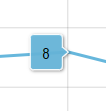
As you can see it displays a square, variable width tooltip to the side of the data item currently being hovered:
Making tooltip round
We're now going to go ahead and give our tooltip a complete makeover.
For that we're going to take the following steps:
- Round the corners for tooltip to the size of our target circle:
series.tooltip.background.cornerRadius = 20 - Disable outline so that pointer does not look like it's cut off from the tooltip body by rounded corners:
series.tooltip.background.strokeOpacity = 0 - Change the orientation for the tooltip to vertical:
series.tooltip.pointerOrientation = "vertical" - Set minimum dimensions for the label in our tooltip:
series.tooltip.label.minWidth = 40
series.tooltip.label.minHeight = 40 - Align the label text so it's right in the center:
series.tooltip.label.textAlign = "middle"
series.tooltip.label.textValign = "middle"
Complete code:
series.tooltipText = "{value}";
series.tooltip.background.cornerRadius = 20;
series.tooltip.background.strokeOpacity = 0;
series.tooltip.pointerOrientation = "vertical";
series.tooltip.label.minWidth = 40;
series.tooltip.label.minHeight = 40;
series.tooltip.label.textAlign = "middle";
series.tooltip.label.textValign = "middle";
series.tooltipText = "{value}";
series.tooltip.background.cornerRadius = 20;
series.tooltip.background.strokeOpacity = 0;
series.tooltip.pointerOrientation = "vertical";
series.tooltip.label.minWidth = 40;
series.tooltip.label.minHeight = 40;
series.tooltip.label.textAlign = "middle";
series.tooltip.label.textValign = "middle";
{
  // ...
  "series": [{
    "type": "LineSeries",
    // ...
    "tooltipText": "{value}",
    "pointerOrientation": "vertical",
    "tooltip": {
      "background": {
        "cornerRadius": 20,
        "strokeOpacity": 0
      },
      "label": {
        "minWidth": 40,
        "minHeight": 40,
        "textAlign": "middle",
        "textValign": "middle"
      }
    }
  }]
}
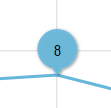
This should result in tooltip looking like this:
See the Pen amCharts 4: Drop-like tooltip shape (2) by amCharts (@amcharts) on CodePen.